


Shearwater Teric Screen Protector Kit
In stock — ships from Irvine, CA
This item is currently on backorder. Order now to reserve yours, and we will ship it as soon as it is back in stock.
Shearwater Teric Screen Protector Kit is backordered and will ship as soon as it is back in stock.
Pickup available at In Store
Usually ready in 2 hours


Shearwater Teric Screen Protector Kit is backordered and will ship as soon as it is back in stock.
-
DiveCatalog DIN Cap for 1st Stage (Female) for Scuba Diving Tanks - Scuba Essentials
$19.95$2.00
1 -
DiveCatalog Hose Clamp for Scuba Diving - Scuba Essentials
$17.95$1.80
1 -
DiveCatalog Neoprene Mask Strap Cover
$17.00$1.70
1 -
DiveCatalog Silicone Mouthpiece Replacement w/ installation - Scuba Essentials
$14.95$1.50
1 -
DiveCatalog Rubber Tank Valve Protector for Scuba Diving Tanks - Scuba Essentials
$11.95$1.20
1


-
DiveCatalog Fin Strap and Scuba Dive Accessory Holder Scuba Accessory Essentials
$9.95$1.00
1 -
DiveCatalog Female Quick Release Clip with Bungee cord for Scuba Accessory Essentials
$8.99$0.90
1 -
DiveCatalog.com Scuba Mouthpiece Cover
$7.95$0.80
1 -
Multi-Purpose Clip with Male and Female Quick Release Clip and Bungee Cord Scuba Accessory Essentials by DiveCatalog
$5.95$0.60
1 -
DiveCatalog Scuba Essentials - PVC Tank Valve Protector for Scuba Diving Tanks
$5.95$0.60
1 -
Whistle with Lanyard in Orange by DiveCatalog
$5.00$0.50
1 -
DiveCatalog.com Stainless Steel 2 Inch Webbing Keeper with Serrated Teeth Weights
$1.95$0.20
1 -
DiveCatalog.com Weight Keeper Stopper - Black
$1.45$0.15
1


Payment & Security
Payment methods
Your payment information is processed securely. We do not store credit card details nor have access to your credit card information.
Save with a package
Ready-made packages that include this item


Product Information
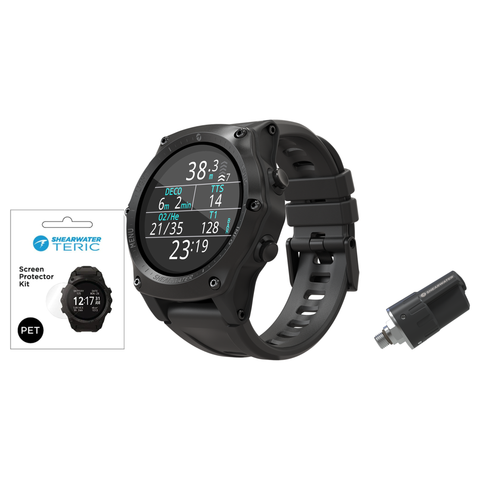
The Shearwater Teric Screen Protector Kit is a peel-and-stick clear PET display protection film die-cut to fit the Shearwater Teric dive computer. Each kit holds two screen protectors plus a full application set, so Teric owners can guard the display from scratches during diving, travel and everyday handling.
Who it is for
This kit is for any diver who owns a Shearwater Teric and wants to keep the display clear and scratch free. The film guards the Teric display against scratches during scuba diving, travel and everyday handling. The second protector lets you replace the film later or recover from an imperfect first application without waiting on another order.
Key details
- Clear PET (polyethylene terephthalate) protection film that keeps the Teric display readable.
- Die-cut to match the Teric screen shape, no trimming required.
- Two screen protectors per kit.
- Simple peel-and-stick installation using the included tools to help avoid bubbles and dust.
- Shearwater SKU 15017.
Compatibility and sizing
The film is cut specifically for the Shearwater Teric dive computer. The film is listed as compatible with the Shearwater Teric only, so confirm your computer is a Teric before ordering.
What's in the box
- 2x PET screen protectors
- Microfiber cloth
- Dust absorber sticker
- Dry and wet wipes
- Squeegee
DiveCatalog.com is an authorized Shearwater dealer and a real dive shop in Irvine, California since 2003. Call 888-701-4017 or start a chat if you want help confirming your computer model or walking through the installation steps.
- Precise fit Film is die-cut to match the Shearwater Teric display.
- Clear PET film Polyethylene terephthalate protection film keeps the screen visible while guarding against scratches.
- Two protectors per kit Includes a spare for replacement or a second attempt at installation.
- Full application kit Comes with a microfiber cloth, dust absorber sticker, dry and wet wipes, and a squeegee.
- Peel-and-stick installation No adhesive mixing or trimming, the included tools help avoid bubbles.
- Teric specific Cut for the Shearwater Teric dive computer.
- Genuine Shearwater accessory Shearwater part number 15017.
| Product | Teric PET Screen Protector Kit |
| Brand | Shearwater |
| SKU | 15017 |
| Compatibility | Shearwater Teric dive computer |
| Material | PET (polyethylene terephthalate), clear |
| Protectors per kit | 2 |
| Installation | Peel-and-stick, die-cut to fit |
| Included items | 2x PET screen protectors, microfiber cloth, dust absorber sticker, dry/wet wipes, squeegee |
| Product type | Dive computer accessory |
- 2x PET screen protector
- Microfiber cloth
- Dust absorber sticker
- Dry and wet wipes
- Squeegee
⚠️ WARNING: This product contains chemicals known to the State of California to cause cancer, birth defects, or other reproductive harm. For more information, visit www.P65Warnings.ca.gov.
Frequently Asked Questions
How many screen protectors come in the Shearwater Teric Screen Protector Kit?
Two. Each kit contains 2x PET screen protectors, so you have a spare for a future replacement or a second attempt if the first application traps dust or bubbles. The kit also includes a microfiber cloth, a dust absorber sticker, dry and wet wipes, and a squeegee to help you get a clean install the first time.
Does this screen protector fit other Shearwater dive computers?
No. The film is die-cut specifically for the Shearwater Teric display, so it is listed as compatible with the Teric only. The film is die-cut for the Teric display and is listed as compatible with the Teric only. Confirm your computer is a Teric before ordering, or contact DiveCatalog.com to check your model.
What is the screen protector made of?
It is made of clear PET, or polyethylene terephthalate, protection film. Clear PET protection film keeps the Teric display visible while guarding it against scratches. Shearwater lists this kit under part number 15017.
How do you install the Teric screen protector?
Installation is peel-and-stick. Use the included microfiber cloth and the dry and wet wipes to clean the Teric display, lift any remaining particles with the dust absorber sticker, then peel the die-cut PET film and lay it onto the screen. Work out air with the included squeegee for a bubble-free finish.
