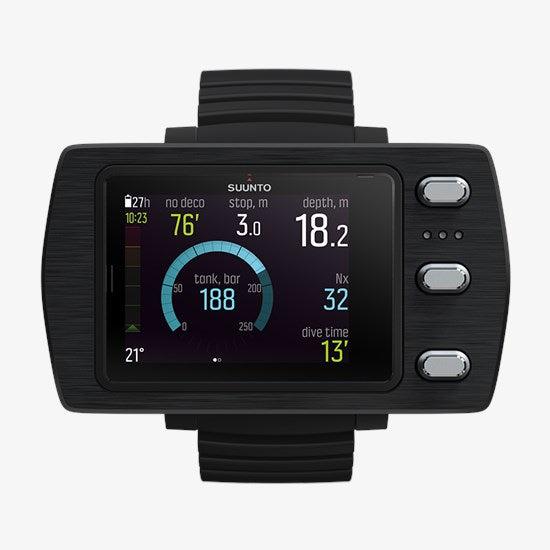
Suunto Eon Steel Dive Computer with Boot and USB Cable
In stock — ships from Irvine, CA
Suunto Eon Steel Dive Computer with Boot and USB Cable - STEEL BLACK is backordered and will ship as soon as it is back in stock.
Pickup currently unavailable at 23D

You May Need These
Description
Description
The Suunto EON Steel Dive Computer with Boot and USB Cable is built for divers who require reliable scuba and diving gear under demanding conditions. It features a wide-angle BrightSee color screen for easy visibility and customizable views for gas management across multiple intervals. The device supports Gauge, Air, Nitrox, Trimix, and CCR modes and uses Suunto Fused RGBM to maximize dive time while maintaining no-decompression limits.
With exceptional durability, the EON Steel combines a brushed stainless steel bezel with Xensation glass and a reinforced composite case, ready for deep dives to 150 m. It runs on a rechargeable battery offering up to 20-40 hours of dive time per charge, and it pairs wirelessly with Suunto Tank PODs for tank pressure readings and with the Suunto app for logging and sharing adventures. The package includes a protective boot and USB cable for continued use as part of your diving gear setup.
Features
Features
- SUPERIOR VIEWING — Wide-angle BrightSee color screen for clear scuba diving readouts, high-contrast display with large numbers, always-on LED backlight, flip display, visually intuitive and consistent presentation
- EXTREME DURABILITY — Brushed stainless steel bezel, highly durable Xensation™ glass, robust mechanical construction, extensively tested and built to last, guaranteed to 150 m depth, rechargeable battery (20-40 hours of dive time with one charge)
- CONNECT AND TRANSFER — Wireless tank pressure readings from up to 10 Suunto Tank PODs, Bluetooth connectivity to Suunto app to keep a dive log and share your adventures, plan and customize easily with Suunto DM5
- FOR ALL DIVING — Gauge/Air/Nitrox/Trimix/CCR (fixed point), Suunto Fused RGBM for maximizing dive time, no-decompression dive planner, tilt compensated 3D digital compass, user-updatable software
Specifications
Specifications
Specifications
| Specification | Details |
|---|---|
| Weight | 347 g / 12.24 oz |
| Bezel material | Stainless steel |
| Glass material | Xensation Glass |
| Case material | Reinforced composite |
| Strap material | Elastomer, Bungee |
| What's in the box? | Suunto EON Steel Black, USB Cable, Quick Guide, Safety and Regulatory leaflet, International warranty leaflet, Protective boot, Display scratch guard sticker, Bungee adapter and extra strap loop, Suunto sticker |
| Country of manufacture | FI |
Payment & Security
Payment methods
Your payment information is processed securely. We do not store credit card details nor have access to your credit card information.
WARNING: This product contains chemicals known to the State of California to cause cancer, birth defects, or other reproductive harm. For more information, visit www.P65Warnings.ca.gov.
Frequently Asked Questions
Why do I need my own dive computer?
A dive computer tracks the actual depth and time profile you have dived and the tissue loading that follows from it, which is personal to you. A rented computer has no record of your recent diving, and swapping models each trip means relearning the display and menus when you should be focused on the dive. Owning one you know well is a genuine safety and comfort improvement.
Can two divers share one dive computer?
No. A computer only tracks the profile of the diver actually wearing it, and even buddies who stay together do not follow identical depth and time profiles. Every diver needs their own computer, and passing one between divers or between dives is unsafe.
What does conservatism mean on a dive computer?
Conservatism settings make the computer's calculations more cautious, shortening allowed bottom times and adding margin beyond the base algorithm. Divers commonly add conservatism for factors such as cold, hard work, fatigue, or repetitive multi-day diving. How and when to adjust it is covered by your training and your computer's manual, so set it before you get in the water and follow what your computer tells you during the dive.
What kind of battery does a dive computer use?
Broadly there are two types: user-replaceable batteries, often a coin cell that you or a shop swap along with resealing an o-ring, and sealed rechargeable batteries that charge from a cable or dock. Neither is universally better, as replaceable cells are convenient on remote trips while rechargeables avoid ever opening the case. Follow the manual exactly for any battery change, because an improperly seated o-ring or case is the usual cause of a flooded computer.
Do I need to do anything special for altitude diving or flying after diving?
Yes, both change the picture, and both are governed by your training agency's guidance and your computer's instructions rather than any casual rule of thumb. Many computers have an altitude setting that must be configured before diving at elevation, and most display a no-fly or surface-interval countdown after a dive. Follow your computer and your training, and ask a dive professional or a dive-medicine specialist if you are unsure.
How do I care for a dive computer?
Rinse it in fresh water after every dive day, paying attention to the buttons and around any sensor openings where salt crystals form, and let it dry fully before storing. Keep it out of prolonged direct sun and extreme heat, and avoid pressing buttons while sand is on the case. Inspect the strap or bungee often, because a failed strap loses far more computers than a failed computer does.
What is the difference between wrist, console, and air-integrated dive computers?
A wrist computer is worn like a watch and read by raising your arm, while a console computer sits at the end of a hose with your other gauges. Air integration means the computer also displays cylinder pressure, either through a hose or from a wireless transmitter on the first stage, and often estimates remaining gas time. All of them run a decompression algorithm, so the real difference is where you read the information and how much of it you get.